
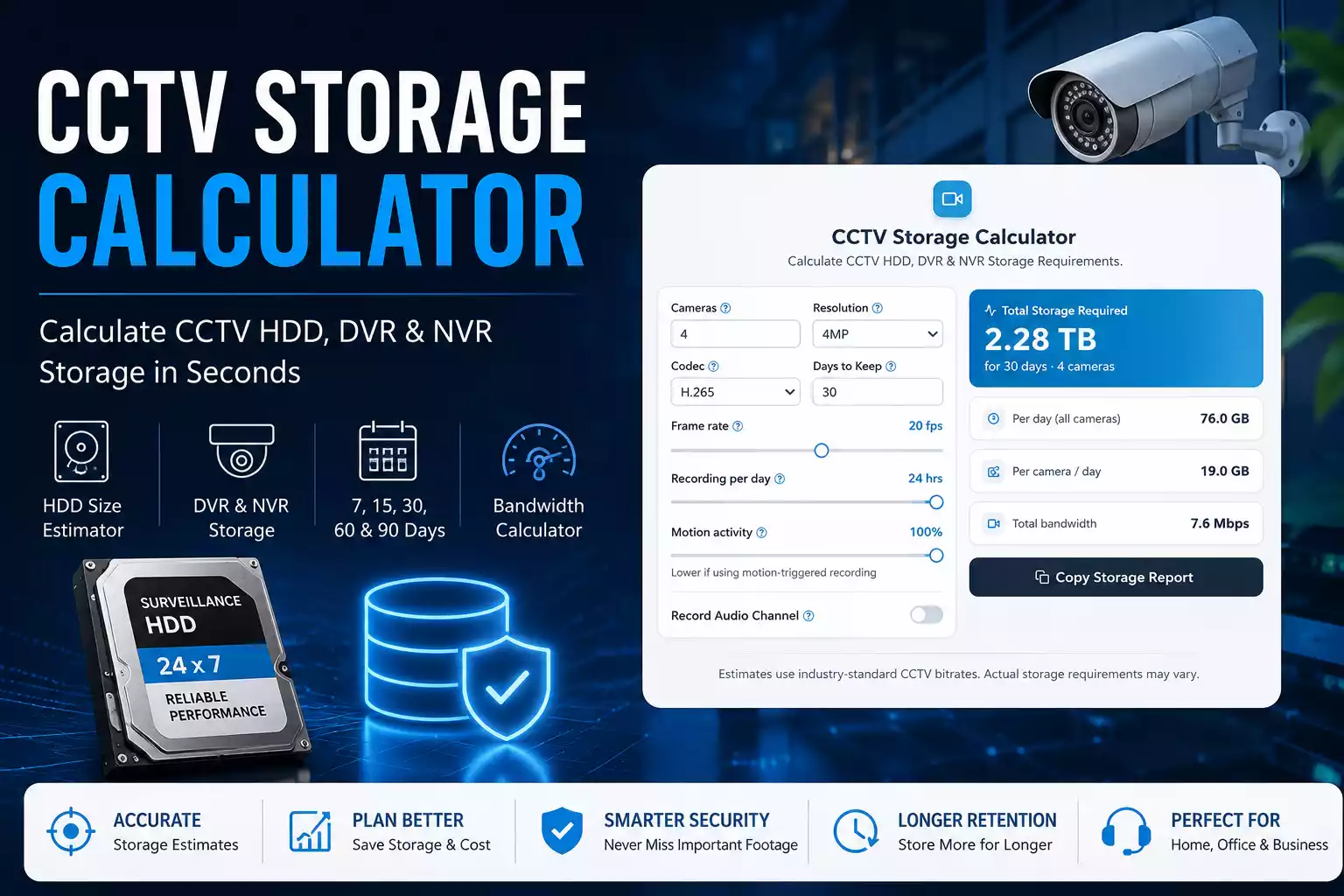
Choosing the wrong CCTV hard drive is one of the most common mistakes I see among homeowners and businesses. A CCTV storage calculator helps estimate exactly how much storage you need based on camera count, resolution, compression, recording hours, and retention period. Instead of guessing whether a 1TB or 4TB drive is enough, you can calculate your storage requirements in seconds and avoid losing important footage when your hard drive fills up.
Whether you’re installing a new security camera system or upgrading an existing DVR or NVR, knowing your storage requirements saves money and prevents unexpected recording failures.
In this guide, I’ll show you how to calculate CCTV storage requirements, estimate the right HDD size, compare H.264 vs H.265 compression, and use my free CCTV Storage Calculator to plan your DVR or NVR system.
If you need software to monitor your cameras after calculating storage, check out our iVMS 4200 Download guide for Windows.
Calculate Your CCTV Storage Requirements
Use the interactive calculator below to estimate storage capacity, daily usage, and network bandwidth for your surveillance system.
Calculate CCTV HDD, DVR & NVR Storage Requirements .
Estimates use industry-standard CCTV bitrates. Actual storage requirements may vary.
What Is a CCTV Storage Calculator?
A CCTV Storage Calculator estimates how much hard drive space your surveillance system requires.
Instead of buying storage based on guesswork, it calculates the required capacity using multiple variables:
- Number of cameras
- Camera resolution
- Frame rate (FPS)
- Video compression
- Recording schedule
- Storage retention period
The result tells you approximately how many gigabytes or terabytes of storage your CCTV system will consume.
I always recommend calculating storage before purchasing a surveillance hard drive because replacing an undersized drive later costs more than buying the correct size initially.

Why do security cameras need storage planning?
Every security camera records video continuously or whenever motion is detected.
Each recorded frame consumes storage space.
If your storage becomes full, the DVR or NVR usually starts overwriting the oldest footage.
Without proper surveillance storage planning, you might discover that an important incident was automatically deleted before you had a chance to review it.
That’s why professional CCTV installers always calculate storage requirements before selecting an HDD.
What Is a CCTV HDD Calculator?
A CCTV HDD Calculator is a specialized tool designed to estimate surveillance hard drive requirements.
Unlike a normal file size calculator, it considers:
- Video bitrate
- Camera count
- Resolution
- Compression technology
- Recording hours
- Retention period
The calculator then recommends an appropriate surveillance hard drive size.
For example:
| Cameras | Resolution | Recording | Suggested HDD |
|---|---|---|---|
| 2 | 1080P | 24×7 | 1TB |
| 4 | 1080P | 24×7 | 2TB |
| 8 | 2MP | 24×7 | 4TB |
| 16 | 4MP | 24×7 | 8TB |
These recommendations are estimates and may vary depending on bitrate and recording settings.
What Is a CCTV Hard Drive Calculator?
Many users search for a CCTV Hard Drive Calculator, but it serves the same purpose as a CCTV Storage Calculator.
Its job is to answer questions like:
- Should I buy a 1TB drive?
- Is 2TB enough for 30 days?
- How much storage does my DVR need?
- Which HDD size is best for four cameras?
- How many days can 4TB record?
Instead of manually calculating hundreds of gigabytes, the calculator produces an instant estimate.
What Is a Surveillance Storage Calculator?
A Surveillance Storage Calculator is commonly used by:
- Security installers
- Homeowners
- Retail stores
- Offices
- Warehouses
- Apartment societies
The calculator helps determine:
- Daily storage usage
- Weekly storage usage
- Monthly storage usage
- Annual storage requirements
It also helps compare multiple camera configurations before making a purchase.
Why Should You Calculate CCTV Storage Before Buying a Hard Drive?
Because every camera system is different.
Many people assume:
“Four cameras means I only need a 1TB hard drive.”
Unfortunately, that isn’t always true.
Let’s compare two systems.
| System | Storage Requirement |
|---|---|
| 4 Cameras, 720P, Motion Recording | Less than 1TB |
| 4 Cameras, 4MP, Continuous Recording | More than 2TB |
The difference comes from bitrate, compression, and recording schedule.
That’s why I never recommend buying storage based only on camera count.
What Happens If You Buy Too Little Storage?
Several problems can occur.
Older footage gets deleted
Most DVRs automatically overwrite old recordings.
Important evidence disappears
If you need footage from three weeks ago but your system only stores seven days, it will already be gone.
Constant hard drive usage
Small drives fill quickly, increasing overwrite cycles.
Difficult investigations
Businesses often discover missing footage only after an incident occurs.
Planning storage correctly avoids all of these problems.
Which Factors Affect CCTV Storage Requirements?
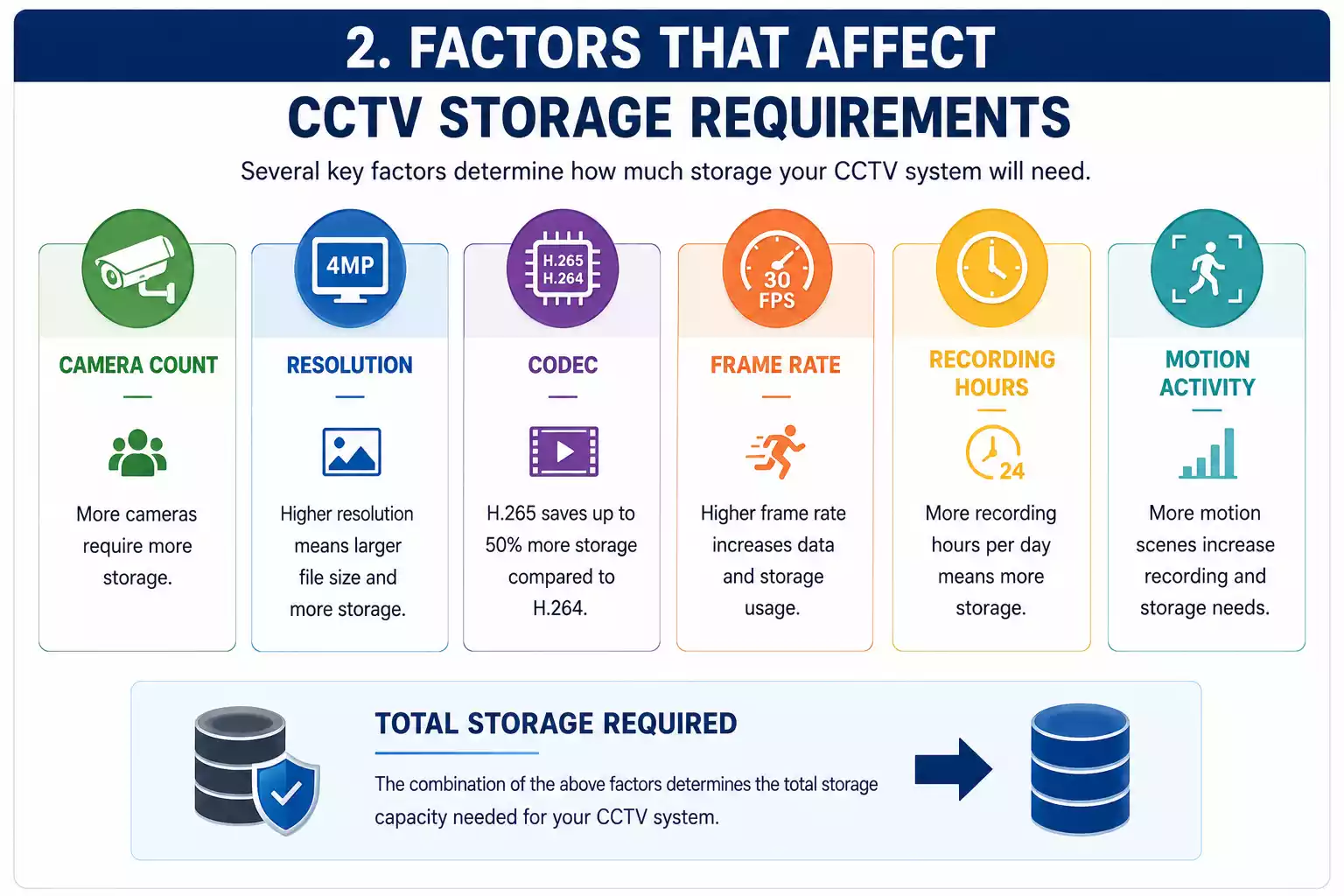
Many people think only resolution affects storage.
In reality, multiple variables determine how much hard drive space your surveillance system consumes.
Camera Resolution
Higher resolution means more pixels.
More pixels produce larger video files.
Typical storage order:
720P < 1080P < 2K < 4MP < 5MP < 8MP
Video Compression
Modern cameras support:
- H.264
- H.264+
- H.265
- H.265+
Better compression significantly reduces storage consumption.
In many real-world installations, switching from H.264 to H.265 reduces storage usage by approximately 40–60% while maintaining similar visual quality.
Number of Cameras
Every additional camera increases storage requirements.
Example:
| Cameras | Relative Storage |
|---|---|
| 1 | 100% |
| 2 | 200% |
| 4 | 400% |
| 8 | 800% |
Doubling the number of cameras almost doubles the storage requirement.
Recording Schedule
Continuous recording uses the most storage.
Motion recording stores footage only when movement is detected.
Smart recording combines both methods for better efficiency.
For many residential installations, motion recording dramatically extends storage retention without purchasing a larger hard drive.
Frame Rate (FPS)
Higher FPS creates smoother video but increases storage usage.
Typical settings:
| FPS | Usage |
|---|---|
| 10 FPS | Low Storage |
| 15 FPS | Balanced |
| 20 FPS | High |
| 30 FPS | Maximum Storage |
For most security applications, 15 FPS provides an excellent balance between video quality and storage consumption.
Dahua users can manage multiple devices using Smart PSS Download, making storage planning and surveillance management much easier.
Why I Always Recommend Using a Storage Calculator
After helping users choose DVRs, NVRs, and surveillance hard drives, I have noticed one common pattern:
People almost always underestimate their storage needs.
Spending a minute with a CCTV Storage Calculator is much easier than replacing a full hard drive or discovering that important recordings have already been overwritten.
Instead of guessing, calculate first and buy once.
How Does a CCTV Storage Calculator Work?
A CCTV Storage Calculator estimates the amount of hard drive space required by analyzing the amount of video data your cameras generate over a specific period. Instead of performing complex calculations manually, the calculator combines multiple variables and provides an estimated storage requirement within seconds.
Although every CCTV manufacturer uses slightly different bitrate values, the basic calculation process remains the same.
The calculator considers the following inputs:
- Number of cameras
- Camera resolution
- Video compression (H.264 or H.265)
- Frame rate (FPS)
- Recording mode (Continuous or Motion Detection)
- Recording hours per day
- Retention period (7, 15, 30, 60, or 90 days)
Once these values are entered, the calculator estimates:
- Daily storage consumption
- Weekly storage consumption
- Monthly storage consumption
- Total storage required
- Recommended hard drive size
This approach eliminates guesswork and helps users purchase the correct surveillance hard drive from the beginning.
Why Is a CCTV Recording Storage Calculator More Accurate Than Guessing?
Many users simply search for “best hard drive for CCTV” and buy the first recommendation they find.
I don’t recommend this approach.
For example, consider these two systems:
| Configuration | Estimated Storage for 30 Days |
|---|---|
| 4 Cameras, 1080P, Motion Recording | Approximately 500GB |
| 4 Cameras, 1080P, Continuous Recording | Approximately 1.5TB |
| 4 Cameras, 4MP, Continuous Recording | More than 2TB |
Even though the camera count remains the same, storage requirements change dramatically.
That’s why a CCTV Recording Storage Calculator is one of the most useful planning tools for any surveillance project.
Which Factors Does the Calculator Analyze?
Camera Resolution
Resolution directly affects video file size.
| Resolution | Relative Storage Usage |
|---|---|
| 720P | Low |
| 1080P | Medium |
| 2K | Medium-High |
| 4MP | High |
| 5MP | Very High |
| 8MP (4K) | Maximum |
Higher resolution provides better image quality but requires significantly more storage.
Video Bitrate
Bitrate determines how much data is recorded every second.
Higher bitrates improve image quality but increase storage usage.
Typical examples:
| Resolution | Typical Bitrate |
|---|---|
| 720P | 1 Mbps |
| 1080P | 2 Mbps |
| 4MP | 4 Mbps |
| 8MP | 8 Mbps |
The storage calculator uses these values to estimate total storage requirements.
Video Compression
Modern surveillance systems primarily use:
H.264
- Good quality
- Larger file sizes
- Compatible with older systems
H.265
- Better compression
- Smaller files
- Longer recording retention
- Lower storage costs
I usually recommend H.265 whenever the camera and NVR both support it because it can significantly reduce storage consumption.
Recording Mode
Continuous Recording
Records 24 hours a day.
Advantages:
- Never misses an event
- Complete recording history
Disadvantages:
- Uses the most storage
Motion Detection Recording
Records only when movement occurs.
Advantages:
- Saves storage
- Extends retention period
- Reduces unnecessary footage
Disadvantages:
- Incorrect sensitivity settings may miss events
For most homes and small offices, motion recording offers the best balance between security and storage efficiency.
How Can You Calculate CCTV Storage Manually?
Even without an online calculator, you can estimate storage requirements using a simple formula.
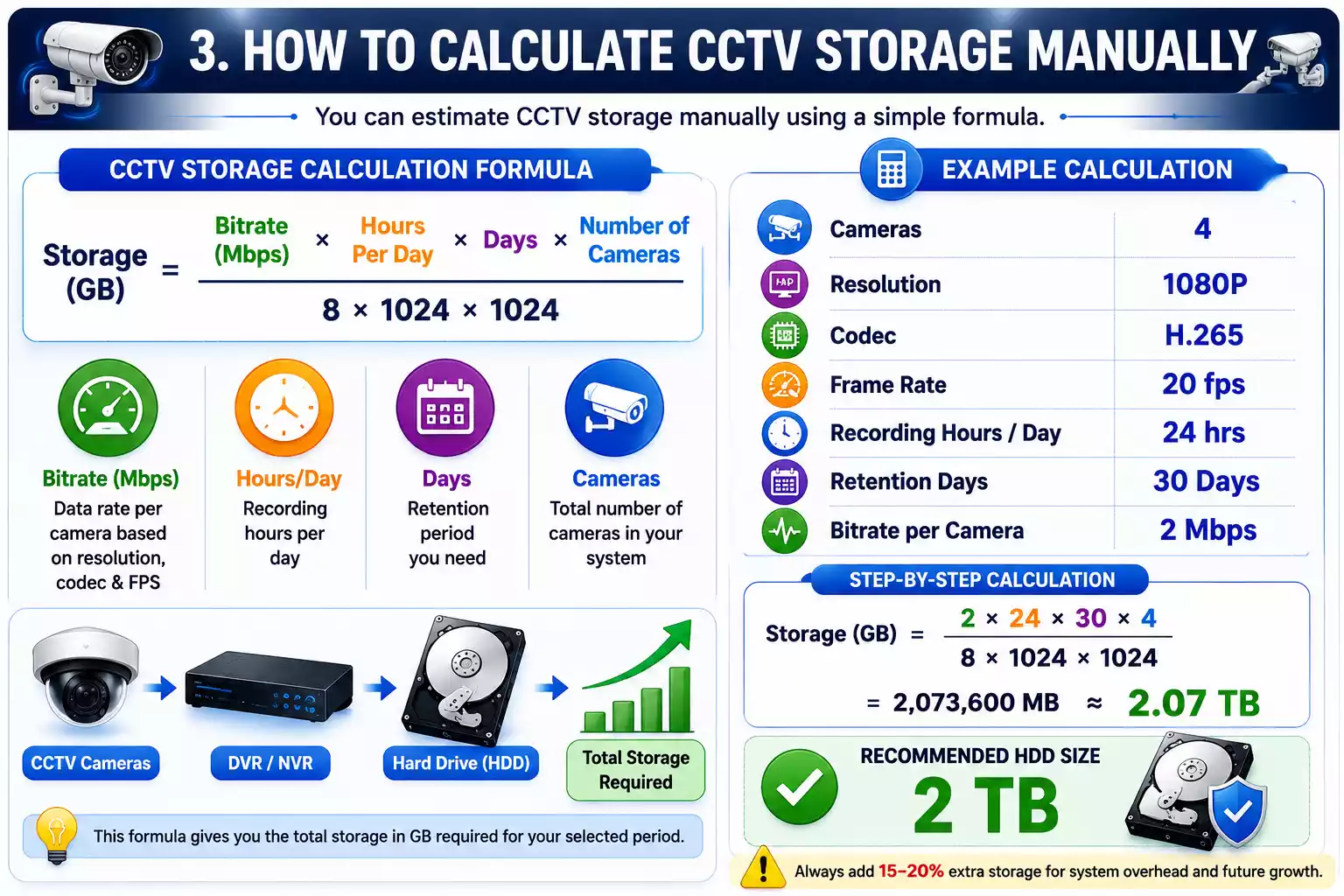
CCTV Storage Formula
Storage (GB) =
(Bit Rate × Recording Hours × 3600 × Days × Number of Cameras)
÷ (8 × 1024 × 1024)
Although the formula looks technical, understanding it helps you verify calculator results.
Manual Calculation Example 1
4 Cameras
Configuration:
- Resolution: 1080P
- Bitrate: 2 Mbps
- Recording: 24 Hours
- Retention: 30 Days
Step 1
Storage per camera per day
2 Mbps × 24 Hours

≈ 21 GB/day
Step 2
Four cameras
21 GB × 4

≈ 84 GB/day
Step 3
Thirty days
84 GB × 30

≈ 2520 GB

≈ 2.5TB
Result:
A 4-camera 1080P system recording continuously for 30 days requires approximately 2.5TB of storage.
A 3TB or 4TB surveillance hard drive would be a practical choice.
Manual Calculation Example 2
8 Cameras
Configuration:
- Resolution: 2MP
- H.265 Compression
- Motion Recording
- 30 Days
Average storage per camera:
Approximately 10GB/day
Calculation:
10GB × 8 Cameras × 30 Days

= 2400GB

≈ 2.4TB
Recommended storage:
A 4TB surveillance HDD provides additional safety margin.
For remote viewing on a computer, you can also install DMSS for PC and access your cameras from anywhere.
What Is an NVR Storage Calculator?
An NVR Storage Calculator is designed specifically for IP camera systems.
Instead of analog DVR cameras, it calculates storage requirements for:
- IP Cameras
- PoE Cameras
- Network Video Recorders
- Enterprise Surveillance Systems
The calculation process remains almost identical but typically uses higher bitrates because IP cameras often support higher resolutions.
DVR Storage Calculator vs NVR Storage Calculator
| Feature | DVR | NVR |
|---|---|---|
| Camera Type | Analog | IP Cameras |
| Resolution | 720P–1080P | 1080P–4K |
| Storage Usage | Lower | Higher |
| Network Required | No | Yes |
| Calculation Method | Bitrate Based | Bitrate Based |
Although both calculators perform similar calculations, NVR systems usually require larger hard drives due to higher-quality video streams.
What Is a CCTV Bandwidth and Storage Calculator?
Many users confuse storage and bandwidth, but they measure different things.
Storage
Storage determines:
How much video you can save.
Measured in:
- GB
- TB
Bandwidth
Bandwidth determines:
How much data travels through your network every second.
Measured in:
- Mbps
- Gbps
Why Should You Calculate Bandwidth Too?
Imagine eight 4MP IP cameras streaming live video simultaneously.
Even if you have enough storage, insufficient network bandwidth may cause:
- Video lag
- Frame drops
- Delayed playback
- Network congestion
That’s why professional installers calculate both storage and bandwidth before installing large surveillance systems.
Example CCTV Bandwidth Calculation
Suppose you have:
| Cameras | Bitrate |
|---|---|
| 8 Cameras | 4 Mbps each |
Total bandwidth:
8 × 4 Mbps

= 32 Mbps
Your NVR and network infrastructure should comfortably support at least 32 Mbps of continuous video traffic.
CCTV Bandwidth and Storage Planning Table
| Cameras | Resolution | Bandwidth | Daily Storage |
|---|---|---|---|
| 2 | 1080P | 4 Mbps | 42GB |
| 4 | 1080P | 8 Mbps | 84GB |
| 8 | 2MP | 16 Mbps | 170GB |
| 16 | 4MP | 64 Mbps | 680GB |
These values are estimates and may vary depending on bitrate and compression settings.
What Is Surveillance Storage Planning?
Surveillance storage planning means determining the right storage capacity before purchasing hardware.
I always follow this simple checklist:
Step 1
Count the number of cameras.
Step 2
Select camera resolution.
Step 3
Choose H.264 or H.265 compression.
Step 4
Decide between continuous or motion recording.
Step 5
Choose the required retention period.
Step 6
Use a CCTV Storage Calculator to estimate total storage.
Step 7
Add an additional 15–20% storage buffer for future expansion.
Common Storage Planning Mistakes
Buying Storage Based Only on Camera Count
Four cameras can require anywhere from less than 500GB to more than 3TB depending on recording settings.
Ignoring Compression Technology
Many users still use H.264 even though H.265 can dramatically reduce storage usage.
Not Planning for Future Cameras
If you plan to add more cameras later, purchase a larger surveillance HDD now instead of replacing it later.
Choosing Consumer Desktop Drives
Desktop hard drives are not designed for continuous 24/7 recording.
Surveillance-grade drives are optimized for constant write operations and generally provide better reliability in CCTV systems.
Quick Storage Estimation Chart
| System | Recommended HDD |
|---|---|
| 2 Cameras, 1080P, 30 Days | 1TB |
| 4 Cameras, 1080P, 30 Days | 2TB |
| 8 Cameras, 1080P, 30 Days | 4TB |
| 16 Cameras, 4MP, 30 Days | 8TB |
| 32 Cameras, 4MP, 30 Days | 16TB+ |
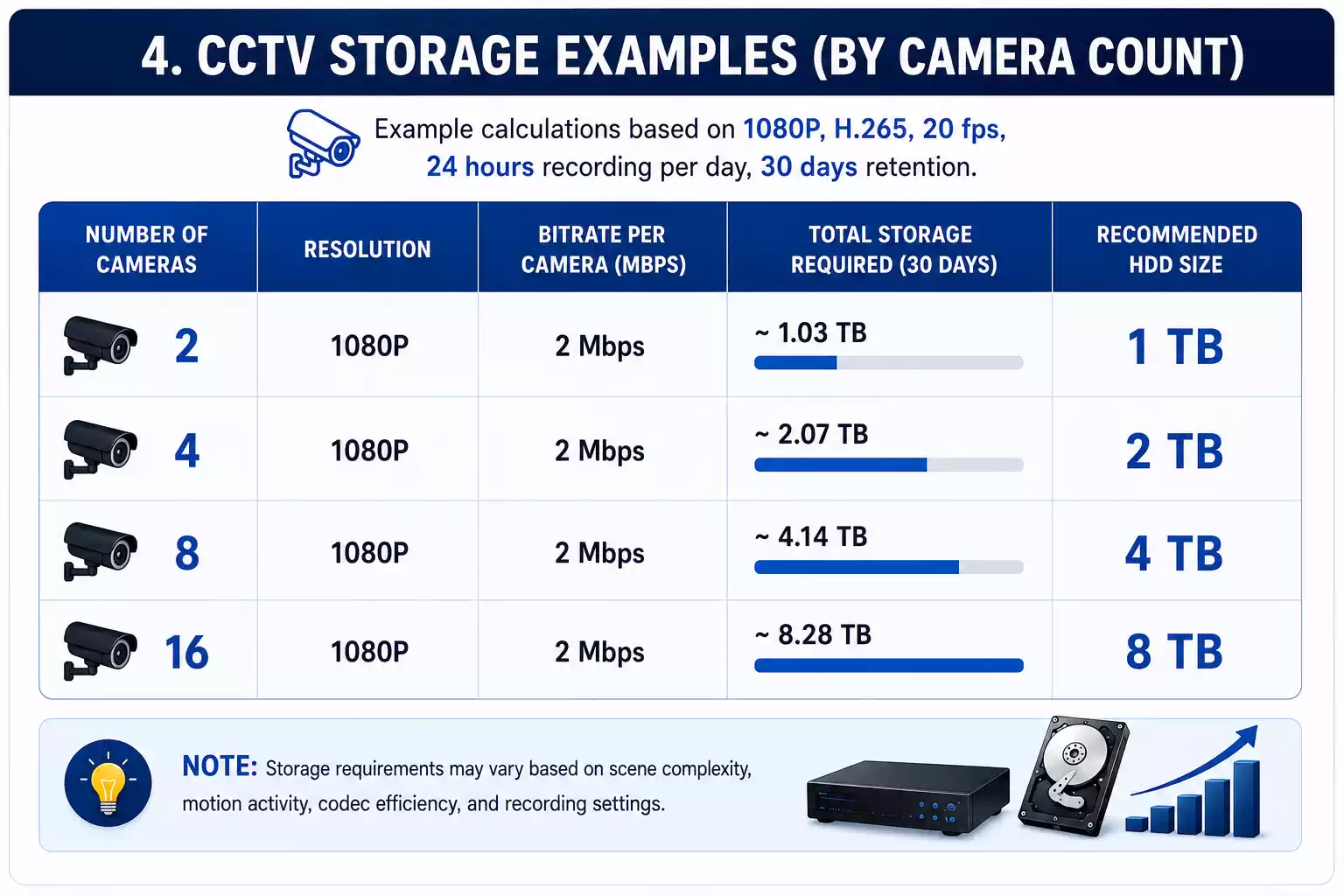
What Does a Real CCTV Storage Calculation Look Like?
One of the biggest mistakes I see is people relying only on general recommendations like “buy a 2TB hard drive for four cameras.” In reality, storage depends on how your cameras are configured.
The examples below use average industry bitrates and are designed to help you estimate storage requirements before using the interactive CCTV Storage Calculator.
Note: Actual storage usage may vary depending on camera manufacturer, scene complexity, frame rate, smart encoding, and recording mode.
How Much Storage Does a 2-Camera CCTV System Need?
A small home or apartment usually uses two cameras covering the entrance and backyard.
Example Configuration
| Setting | Value |
|---|---|
| Cameras | 2 |
| Resolution | 1080P |
| Compression | H.265 |
| Recording | Continuous |
| Recording Hours | 24 |
| Retention | 30 Days |
Estimated Storage
| Period | Storage |
|---|---|
| Per Day | 20–25 GB |
| 7 Days | 150–175 GB |
| 15 Days | 300–375 GB |
| 30 Days | 600–750 GB |
Recommended Hard Drive
1TB Surveillance HDD
This provides additional space for firmware updates, unexpected bitrate spikes, and future camera additions.
Before estimating your hard drive capacity, I also recommend using my IP Camera Bandwidth Calculator to calculate the total network traffic generated by your cameras.
How Much Storage Does a 4-Camera CCTV System Need?
Four-camera systems are the most popular choice for homes and small offices.
Example Configuration
| Setting | Value |
|---|---|
| Cameras | 4 |
| Resolution | 1080P |
| Compression | H.265 |
| Recording | Continuous |
| Retention | 30 Days |
Estimated Storage
| Period | Storage |
|---|---|
| Daily | 45–50 GB |
| Weekly | 320–350 GB |
| Monthly | 1.3–1.5 TB |
Recommended HDD
| Retention | HDD |
|---|---|
| 15 Days | 1TB |
| 30 Days | 2TB |
| 60 Days | 4TB |
I usually recommend purchasing the next larger capacity rather than selecting the minimum requirement.
How Much Storage Does an 8-Camera CCTV System Need?
Many retail stores and medium-sized businesses use eight cameras.
Configuration
- 8 Cameras
- 2MP Resolution
- H.265 Compression
- Continuous Recording
Estimated Storage
| Period | Storage |
|---|---|
| Daily | 90–100 GB |
| 30 Days | 2.7–3 TB |
| 60 Days | 5.5–6 TB |
| 90 Days | 8–9 TB |
Recommended HDD
| Retention | Recommended Storage |
|---|---|
| 30 Days | 4TB |
| 60 Days | 6TB |
| 90 Days | 8TB |
How Much Storage Does a 16-Camera CCTV System Need?
Larger offices, schools, warehouses, and commercial buildings typically require sixteen cameras.
Example
| Setting | Value |
|---|---|
| Cameras | 16 |
| Resolution | 4MP |
| Compression | H.265 |
| Recording | Continuous |
| Retention | 30 Days |
Estimated Storage
| Period | Storage |
|---|---|
| Daily | 350–400 GB |
| Monthly | 10–12 TB |
Recommended Storage
- 12TB Surveillance HDD
- 16TB Surveillance HDD
- Multiple HDD configuration for redundancy
What Happens If You Switch from H.264 to H.265?
One of the easiest ways to reduce storage requirements is enabling H.265 compression.
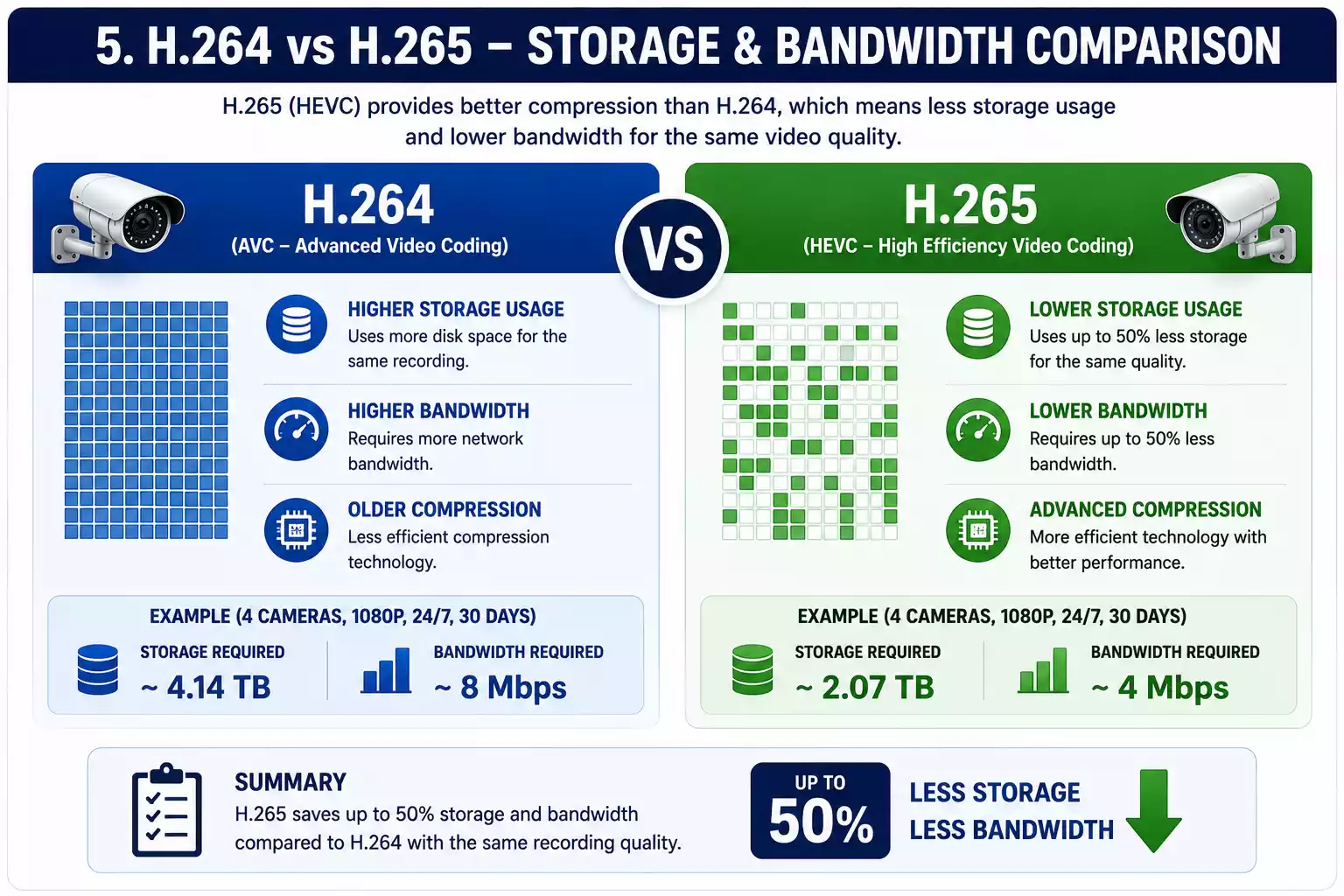
Storage Comparison
| Feature | H.264 | H.265 |
|---|---|---|
| Video Quality | Good | Excellent |
| File Size | Larger | Smaller |
| Storage Required | 100% | 40–60% Less |
| Bandwidth Usage | Higher | Lower |
| Recommended | Older Systems | Modern Systems |
Real Example
Four 1080P cameras recording continuously for 30 days.
| Compression | Estimated Storage |
|---|---|
| H.264 | 2.5TB |
| H.265 | 1.4TB |
Simply changing the compression format can save over 1TB of storage without adding another hard drive.
Which Factors Increase CCTV Storage the Most?
Many people believe resolution is the only factor.
In reality, multiple settings affect storage.
Resolution
Higher resolution captures more detail but increases storage consumption.
| Resolution | Relative Storage |
|---|---|
| 720P | Low |
| 1080P | Medium |
| 2K | Medium-High |
| 4MP | High |
| 8MP | Very High |
Frame Rate
Higher FPS produces smoother video.
| FPS | Storage Impact |
|---|---|
| 10 FPS | Low |
| 15 FPS | Balanced |
| 20 FPS | High |
| 30 FPS | Very High |
For most residential installations, 15 FPS provides an excellent balance between quality and storage.
Scene Complexity
Busy environments require more storage.
Examples include:
- Busy roads
- Shopping malls
- Parking lots
- Marketplaces
Static environments like warehouses or hallways generally produce smaller files because modern compression algorithms detect fewer changes between frames.
Which Hard Drive Size Should You Buy?
Instead of buying the smallest drive that meets your current requirement, I always recommend leaving room for expansion.
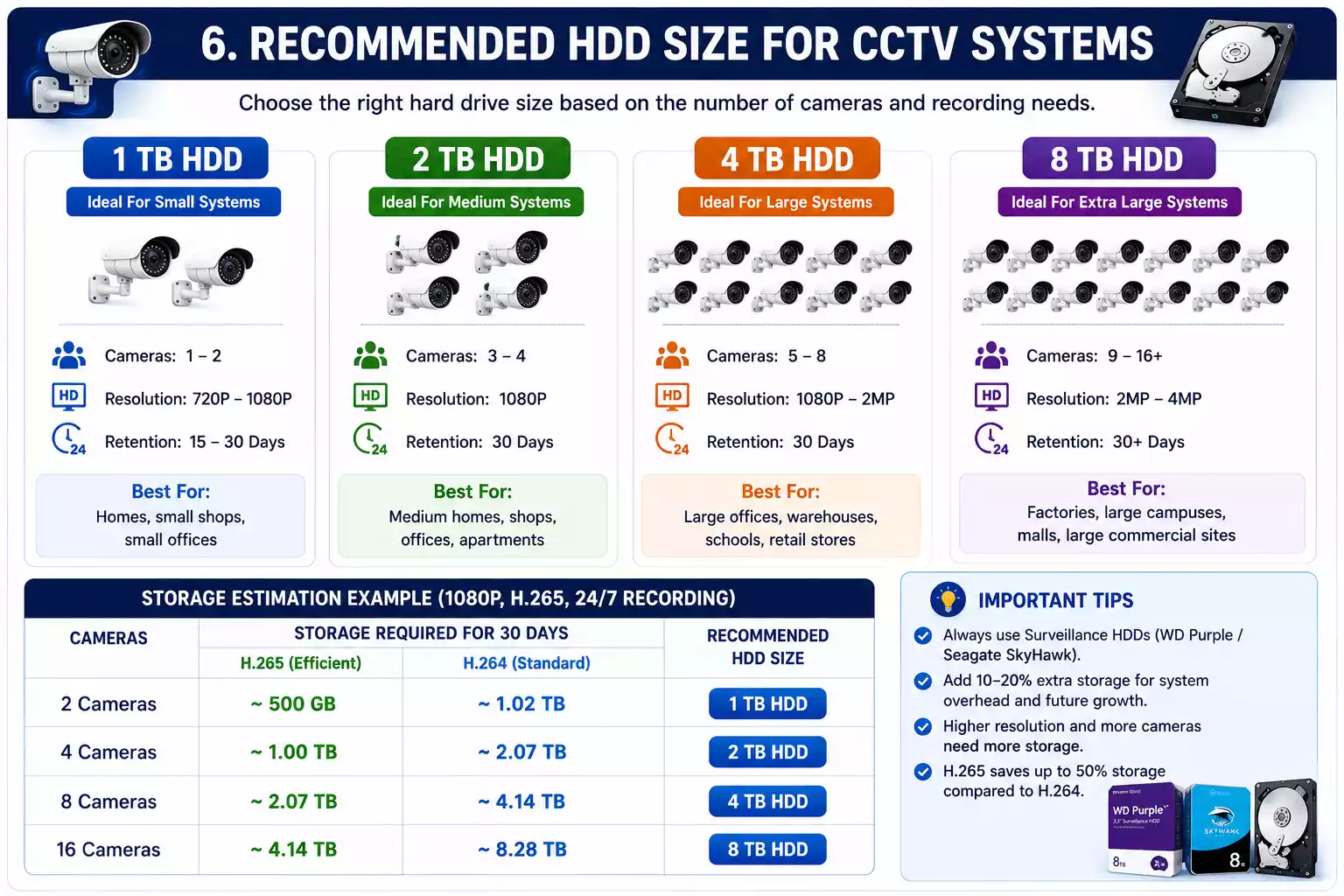
HDD Recommendation Table
| Cameras | 15 Days | 30 Days | 60 Days | 90 Days |
|---|---|---|---|---|
| 2 | 500GB | 1TB | 2TB | 2TB |
| 4 | 1TB | 2TB | 4TB | 4TB |
| 8 | 2TB | 4TB | 6TB | 8TB |
| 16 | 6TB | 8TB | 12TB | 16TB |
| 32 | 12TB | 16TB | 24TB | 32TB |
These values assume H.265 compression and continuous recording.
Should You Use Motion Recording Instead of Continuous Recording?
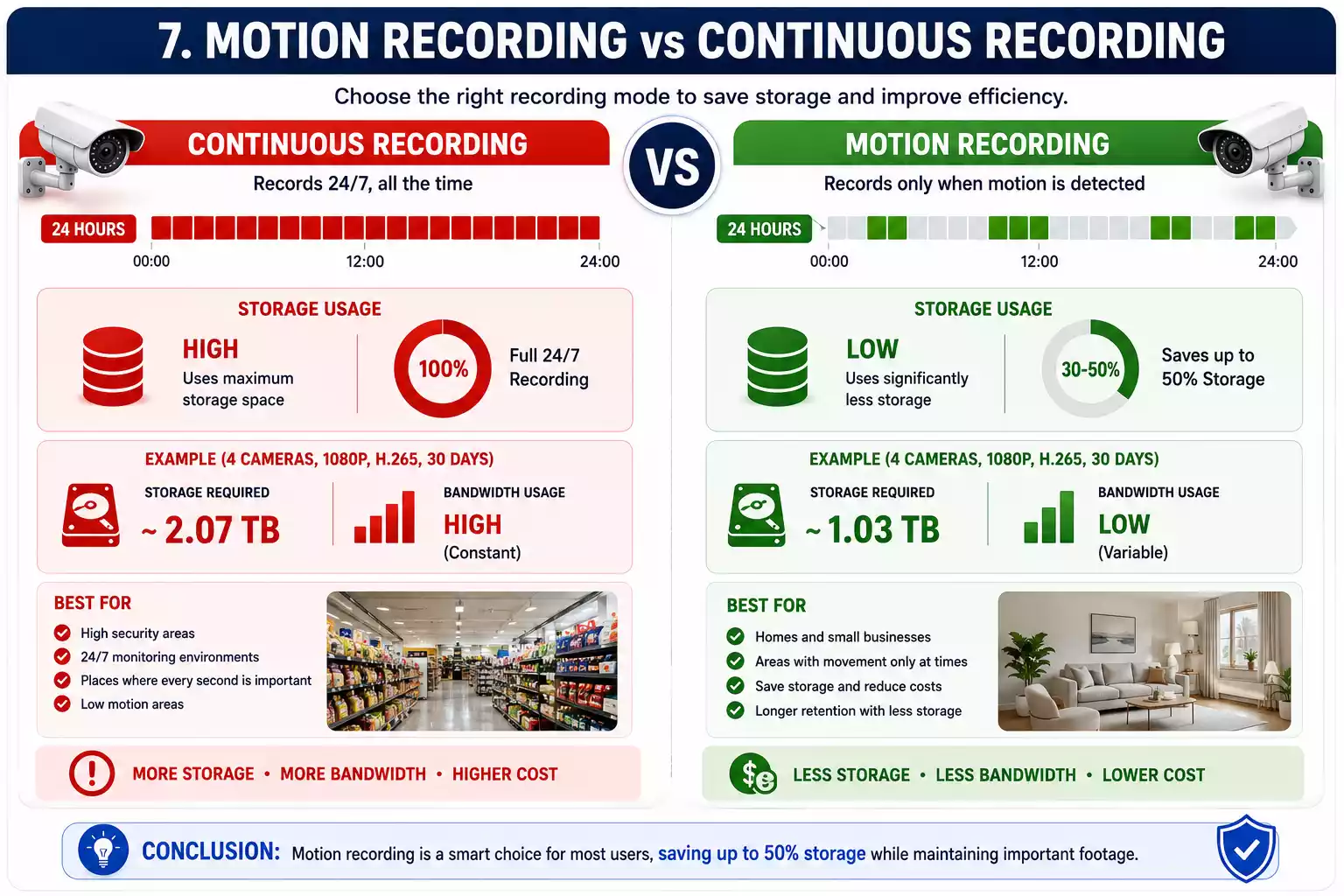
In many situations, yes.
Continuous Recording
Advantages:
- Never misses activity
- Complete timeline
Disadvantages:
- Highest storage consumption
- More hard drive wear
Motion Detection Recording
Advantages:
- Saves storage
- Longer retention
- Lower bandwidth usage
Disadvantages:
- Requires proper sensitivity adjustment
- May miss small movements if configured incorrectly
For homes and offices, I often recommend motion recording because it provides a good balance between storage efficiency and security.
How Can You Reduce CCTV Storage Without Losing Video Quality?
Many users assume buying a larger hard drive is the only solution.
In reality, a few simple settings can dramatically reduce storage usage.
Enable H.265 Compression
This is usually the single biggest storage saver.
Potential reduction:
40–60%
Lower the Frame Rate
Reducing frame rate from 30 FPS to 15 FPS can significantly reduce storage while maintaining smooth playback for most security applications.
Enable Smart Encoding
Many modern cameras support:
- Smart H.264
- Smart H.265
These technologies dynamically adjust bitrate based on scene activity.
Use Motion Detection
Instead of recording empty hallways all night, the system records only when movement occurs.
This can greatly increase retention time without purchasing additional storage.
Adjust Camera Resolution
Not every camera needs 4K resolution.
For indoor hallways or storage rooms, 1080P is often more than sufficient.
What Is the Difference Between Consumer HDDs and Surveillance HDDs?
Many first-time buyers ask whether they can install a regular desktop hard drive in a DVR or NVR.
Technically, yes.
However, I don’t recommend it.
Desktop Hard Drives
Designed for:
- File storage
- Office work
- Occasional read/write operations
Surveillance Hard Drives
Designed for:
- 24×7 recording
- Continuous write operations
- Multiple video streams
- DVR and NVR environments
For a security system that records around the clock, surveillance-grade drives generally provide better long-term reliability.
Common CCTV Storage Planning Mistakes
Buying the Cheapest HDD
Low-cost drives may not be optimized for continuous recording.
Ignoring Future Expansion
Many users add cameras within a year.
Buying a slightly larger drive today can save replacement costs later.
Forgetting Storage Retention Requirements
Some businesses are required to keep footage for 30, 60, or even 90 days.
Always verify your retention requirements before purchasing storage.
Assuming Every Camera Uses the Same Storage
A 720P camera and an 8MP camera can have dramatically different storage requirements.
Always calculate storage using actual camera specifications.
Quick CCTV Storage Planning Checklist
Before purchasing a surveillance hard drive, I always recommend verifying these points:
✅ Number of cameras
✅ Camera resolution
✅ Video compression
✅ Recording mode
✅ Frame rate
✅ Recording hours
✅ Retention period
✅ Future expansion plans
✅ Available NVR or DVR HDD slots
✅ Total storage estimate from the CCTV Storage Calculator
Best Practices for Surveillance Storage Planning
After working with different CCTV systems, I’ve developed a simple checklist that helps avoid common storage problems.
1. Always calculate storage before purchasing hardware.
Never assume that a specific hard drive size will work for every system.
2. Enable H.265 compression whenever possible.
This single setting can dramatically reduce storage consumption.
3. Leave 15–20% extra capacity.
Storage requirements often increase after firmware updates or camera additions.
4. Choose surveillance-grade hard drives.
These drives are designed for continuous recording and generally offer better reliability than desktop HDDs.
5. Review storage usage every few months.
If your retention period is shorter than expected, adjust settings or increase storage capacity before important footage is overwritten.
Frequently Asked Questions
How much storage does a CCTV camera use per day?
A typical 1080P CCTV camera uses approximately 10GB to 30GB of storage per day, depending on bitrate, compression, and recording mode.
From my experience, there isn’t a single answer that fits every camera. A 1080P camera recording continuously with H.265 compression may use around 15GB per day, while the same camera using H.264 at a higher bitrate can consume more than 25GB. That’s why I always recommend using the CCTV Storage Calculator instead of relying on generic estimates.
How many days can 1TB store CCTV footage?
days of continuous recording.
The actual retention depends on:
Camera resolution
Number of cameras
Recording hours
Motion detection
Compression format
For example, a two-camera home setup may keep recordings for over 30 days, while an eight-camera business setup may fill the same drive within a week.
Is H.265 better than H.264 for storage?
Yes.H.265 generally reduces storage usage by 40–60% compared to H.264 while maintaining similar video quality.
Whenever I configure a modern CCTV system, I enable H.265 if both the camera and DVR/NVR support it. It increases storage retention without requiring a larger hard drive and also reduces network bandwidth.
What is the best hard drive size for a 4-camera system?
For most 4-camera 1080P systems, I recommend a 2TB surveillance hard drive for approximately 30 days of continuous recording.
If you use motion recording or H.265 compression, 1TB may be enough. However, I prefer choosing a slightly larger drive to allow future expansion and unexpected storage increases.
Can I use a normal desktop hard drive for CCTV?
Yes, but I don’t recommend it for long-term reliability.
Desktop hard drives are designed for occasional read and write operations, whereas surveillance drives are built for continuous 24×7 recording. A surveillance HDD is optimized for multiple video streams and constant writing, making it a better choice for DVRs and NVRs.
Which is better: continuous recording or motion recording?
Continuous recording captures every second but uses the most storage. Motion recording saves storage and extends retention but requires proper sensitivity settings. For most homes, I find motion recording to be the more practical choice.
Can cloud storage replace a surveillance hard drive?
Cloud storage is excellent for backup and remote access, but many users still prefer local DVR or NVR storage because it offers faster playback, no monthly subscription fees, and continued recording even during internet outages.
How much bandwidth does a CCTV camera use?
Bandwidth depends on bitrate. A 1080P camera typically uses between 2 and 4 Mbps, while a 4K camera may require 8 Mbps or more. If you’re using remote viewing or multiple IP cameras, calculate bandwidth alongside storage requirements.
Which software can I use to monitor CCTV footage on Windows?
You can use gCMOB for PC if you’re using CP Plus systems or KVMS Pro Download for compatible DVRs and NVRs.
Final Thoughts
A CCTV Storage Calculator is one of the simplest yet most valuable tools for planning a surveillance system. Instead of guessing whether a 1TB, 2TB, or 4TB hard drive is enough, you can calculate your requirements based on camera count, resolution, recording mode, compression, and retention period.
Throughout this guide, I’ve covered:
- How CCTV storage is calculated
- Why storage planning matters
- The difference between CCTV HDD and NVR storage calculators
- How bandwidth affects surveillance systems
- Real-world storage examples
- HDD recommendations
- H.264 vs H.265 comparisons
- Practical storage optimization tips
My recommendation is simple: use the interactive CCTV Storage Calculator before purchasing any surveillance hard drive. It takes less than a minute, helps you avoid unnecessary upgrades, and ensures your system retains footage for the number of days you actually need.
Whether you’re securing a home, office, shop, or warehouse, proper surveillance storage planning will save money, reduce maintenance, and give you confidence that important recordings will still be available when you need them.
If you’d like to learn more about surveillance storage and video compression, these resources provide helpful technical information:
- International Organization for Standardization (ISO): https://www.iso.org
- National Institute of Standards and Technology (NIST): https://www.nist.gov
- Internet Engineering Task Force (IETF): https://www.ietf.org
These organizations publish standards and technical guidance related to video, networking, and information systems that support modern surveillance technology.