
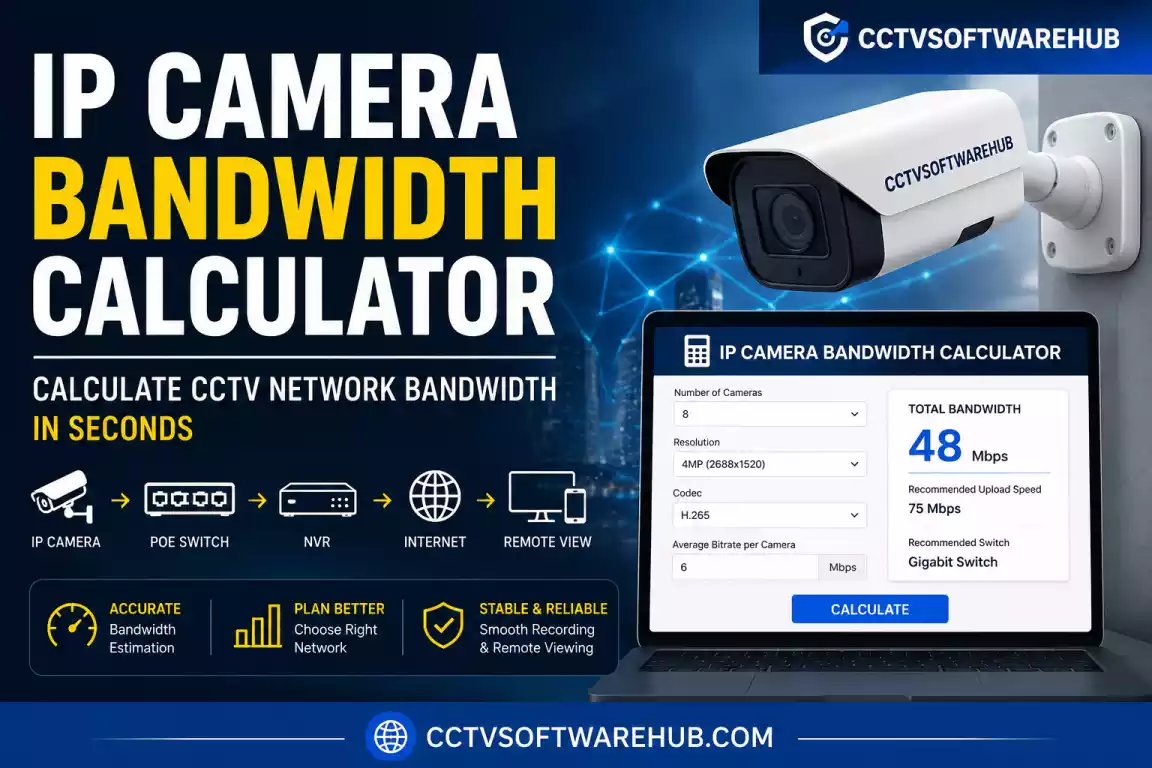
If you’re installing an IP camera system, choosing the right network bandwidth is just as important as selecting the right cameras. I created this free IP Camera Bandwidth Calculator to help you estimate how much bandwidth your CCTV system will use based on the number of cameras, bitrate, resolution, frame rate, and video compression (H.264 or H.265). Whether you’re planning a small home setup or a large commercial surveillance network, this tool helps you avoid lag, dropped frames, overloaded switches, and poor remote viewing performance before installation.
When I install or troubleshoot CCTV systems, one of the most common mistakes I see is people focusing only on storage while ignoring network bandwidth. An NVR with enough hard drive space won’t perform well if your switch, router, or internet connection cannot handle the video traffic.
This IP camera bandwidth calculator estimates the total network load generated by your cameras so you can choose the right PoE switch, router, internet plan, and NVR. Whether you’re using Hikvision, Dahua, CP Plus, Uniview, or any ONVIF-compatible IP camera, the calculation principles remain the same.
By the end of this guide, you’ll not only know how to calculate IP camera bandwidth, but also understand how bitrate, H.264, H.265, frame rate, and camera resolution affect your surveillance network.
Free IP Camera Bandwidth Calculator
Instantly calculate network traffic and hard drive storage requirements for your security system.
How Does the IP Camera Bandwidth Calculator Work?
Unlike many online calculators that simply display a number, I designed this camera bandwidth calculator to help you understand why your cameras consume a certain amount of network bandwidth.
Instead of guessing, the calculator estimates the total traffic generated by your surveillance system using your camera settings.
What Information Do You Need?
The calculator asks for a few basic details:
| Input | Why It Matters |
|---|---|
| Number of Cameras | Total cameras connected to the network |
| Camera Resolution | Higher resolution usually requires higher bitrate |
| Codec (H.264 / H.265) | Determines video compression efficiency |
| Bitrate | The biggest factor affecting bandwidth |
| FPS | More frames increase video data |
| Live View Streams | Helps estimate viewing bandwidth |
| Recording Hours | Useful when paired with storage calculations |
The most important value is bitrate. Once you know the bitrate of each camera, calculating bandwidth becomes straightforward.
What Does the Calculator Show?
After entering the camera details, the calculator displays:
- Per-camera bandwidth
- Total CCTV bandwidth
- Total Mbps
- MB/s conversion
- Estimated LAN traffic
- Recommended switch speed
- Suggested internet upload speed for remote viewing
If you’re also planning your recording storage, I recommend using my CCTV Storage Calculator after completing the bandwidth estimation.
The IP camera bandwidth calculator estimates how much network traffic your surveillance system generates based on the number of cameras, bitrate, resolution, FPS, and codec (H.264/H.265). It helps you size your network correctly before installation.
How Do I Use the IP Camera Bandwidth Calculator?
Many people assume bandwidth planning is complicated, but it only takes a few minutes when you know the correct camera settings.
Here’s how I personally estimate the network requirements before installing a surveillance system.
Step 1: Select the Number of Cameras
Start by entering the total number of IP cameras connected to your NVR or network switch.
For example:
- 4 cameras
- 8 cameras
- 16 cameras
- 32 cameras
The calculator multiplies the bitrate of each camera by the number of cameras to estimate the total bandwidth.
Step 2: Choose the Camera Resolution
Next, select your camera resolution.
Typical options include:
| Resolution | Typical Use |
|---|---|
| 720P | Small homes |
| 1080P | Most residential systems |
| 3MP | Shops |
| 4MP | Offices |
| 5MP | Commercial buildings |
| 8MP (4K) | Warehouses and high-security sites |
Higher resolutions usually require a higher bitrate, resulting in increased bandwidth.
Step 3: Select the Video Codec
Choose between:
- H.264
- H.265
I recommend using H.265 whenever your cameras and NVR support it because it provides the same image quality while significantly reducing bandwidth and storage requirements.
Later in this guide, I’ll compare H.264 vs H.265 in detail.
Step 4: Enter the Bitrate
This is the most important step.
Most camera manufacturers allow you to configure the bitrate manually.
Example values:
| Resolution | Typical Bitrate |
|---|---|
| 720P | 2 Mbps |
| 1080P | 4 Mbps |
| 4MP | 6 Mbps |
| 5MP | 8 Mbps |
| 4K | 12 Mbps |
These values may vary depending on motion, scene complexity, and recording settings.
Step 5: Review the Results
Once you click Calculate, the tool instantly estimates:
- Total network bandwidth
- Camera traffic
- Internet upload requirement
- Recommended switch speed
This helps you determine whether a Fast Ethernet switch is sufficient or if you should invest in a Gigabit network.
Real-Life Example
Let’s say you install:
- 8 cameras
- 1080P
- H.265
- 4 Mbps each
The total bandwidth is approximately:
8 × 4 Mbps = 32 Mbps
In this scenario, even though the total traffic is well below 100 Mbps, I would still recommend a Gigabit switch. It leaves room for future expansion, remote viewing, firmware updates, and additional network devices without creating bottlenecks.
To use the bandwidth calculator for IP cameras, enter the number of cameras, resolution, codec (H.264/H.265), and bitrate. The calculator estimates the total bandwidth, helping you choose the right switch, router, and internet connection before installation.
What Is IP Camera Bandwidth?
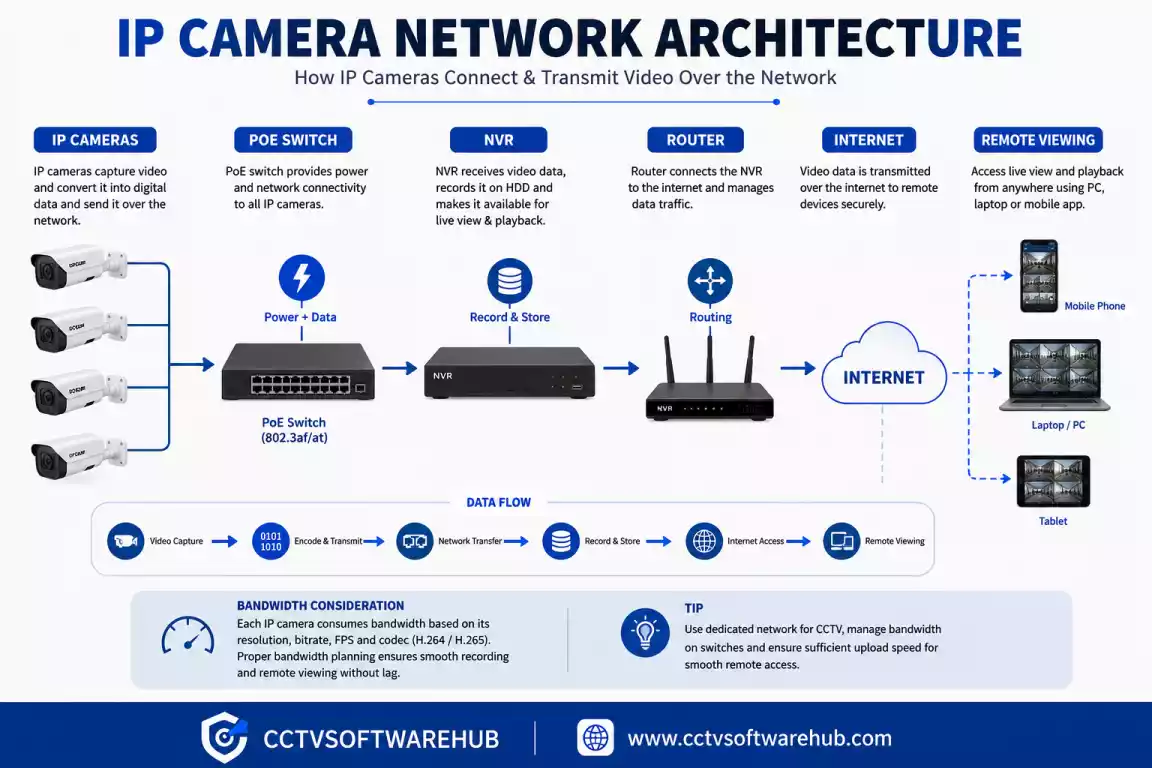
IP camera bandwidth refers to the amount of network data transmitted by a camera over a specific period, usually measured in Mbps (Megabits per second).
Simply put, every IP camera continuously sends video data to an NVR, NAS, cloud service, or monitoring software. That video consumes network bandwidth.
The amount of bandwidth depends mainly on the camera’s bitrate.
Think of bitrate as the speed at which video data is generated, while bandwidth is the network capacity required to carry that data.
For example:
- A camera configured with a 4 Mbps bitrate typically consumes about 4 Mbps of network bandwidth while streaming continuously.
- If you have eight identical cameras, your network needs roughly 32 Mbps of available bandwidth for those streams alone.
This distinction is important because many users confuse bitrate with bandwidth. In practice, the bitrate is a camera setting, while bandwidth is the resulting demand placed on your network infrastructure.
To learn more about IP video networking concepts, you can explore the educational resources from Axis Communications.
Bitrate vs Bandwidth
| Term | Meaning |
|---|---|
| Bitrate | The amount of video data a camera generates each second. |
| Bandwidth | The network capacity required to transport that video data. |
| Throughput | The actual data successfully transmitted over the network. |
| FPS | Frames captured per second; higher FPS generally increases bitrate. |
| Codec | Compression method (H.264 or H.265) that affects bitrate efficiency. |
In my experience troubleshooting CCTV systems, understanding this difference prevents common issues like lag, pixelated video, and overloaded network switches.
IP camera bandwidth is the network capacity needed to carry the video stream generated by each camera. The higher the bitrate, the more bandwidth your surveillance system requires. Bitrate is a camera setting, while bandwidth is the network resource that carries the video.
Why Is Correct Bandwidth Calculation Important?
Choosing cameras without calculating bandwidth is like buying a high-performance car without checking whether the road can support it. Your cameras may produce excellent video, but your network can quickly become the weakest link.
I have seen installations where users purchased high-resolution 4K cameras and connected them to an older 100 Mbps switch. The result was intermittent video freezes, delayed live view, and dropped recordings—not because the cameras were faulty, but because the network couldn’t handle the combined traffic.
Accurate IP camera bandwidth calculation helps you:
- Select the right PoE switch capacity.
- Avoid network congestion during live viewing.
- Ensure smooth recording on the NVR.
- Plan enough upload speed for remote monitoring.
- Leave headroom for future camera expansion.
- Reduce troubleshooting time after installation.
Proper planning also saves money. Instead of replacing networking equipment later, you can size your infrastructure correctly from the beginning.
Calculating IP camera bandwidth before installation helps prevent network congestion, video lag, dropped frames, and poor remote viewing. It ensures your switches, routers, and internet connection can reliably handle the total traffic generated by your surveillance system.
How Is IP Camera Bandwidth Calculated?
Many users think IP camera bandwidth calculation is complicated, but the basic principle is surprisingly simple. In most CCTV installations, the total bandwidth depends primarily on two things:
- The number of cameras
- The bitrate of each camera
Every IP camera continuously sends a video stream to an NVR, NAS, or monitoring software. The size of that video stream is controlled by the configured bitrate. The more cameras you add, the more total network traffic your surveillance system generates.
For example, if one camera streams at 4 Mbps, it consumes approximately 4 Mbps of bandwidth. If you install eight identical cameras, the total network traffic becomes approximately 32 Mbps.
However, real-world installations involve additional variables that can increase or decrease the required bandwidth, including:
- Video codec (H.264 / H.265)
- Resolution
- Frames per second (FPS)
- Constant Bitrate (CBR) or Variable Bitrate (VBR)
- Motion within the scene
- AI analytics
- Audio recording
- Multiple users viewing live video simultaneously
This is why I always recommend using an IP camera bandwidth calculator instead of relying on rough estimates.
Example 1 – Small Home Installation
| Cameras | Resolution | Codec | Bitrate | Total Bandwidth |
|---|---|---|---|---|
| 4 | 1080P | H.265 | 4 Mbps | 16 Mbps |
This setup works comfortably on a Gigabit switch and requires only moderate internet upload speed for remote viewing.
Example 2 – Commercial Office
| Cameras | Resolution | Codec | Bitrate | Total Bandwidth |
|---|---|---|---|---|
| 16 | 4MP | H.265 | 6 Mbps | 96 Mbps |
Although the calculated load is under 100 Mbps, I would still deploy a Gigabit network. Future expansion, firmware updates, and simultaneous viewing sessions can easily push traffic beyond Fast Ethernet limits.
Example 3 – Warehouse
| Cameras | Resolution | Codec | Bitrate | Total Bandwidth |
|---|---|---|---|---|
| 32 | 4K | H.265 | 10 Mbps | 320 Mbps |
At this scale, proper switch selection, uplink capacity, and NVR throughput become critical.
IP camera bandwidth calculation is based mainly on the number of cameras and each camera’s bitrate. Additional factors such as H.264/H.265, FPS, motion, and recording settings influence the final bandwidth requirement.
What Is the Formula for IP Camera Bandwidth Calculation?
The basic formula used by every camera bandwidth calculator is straightforward:
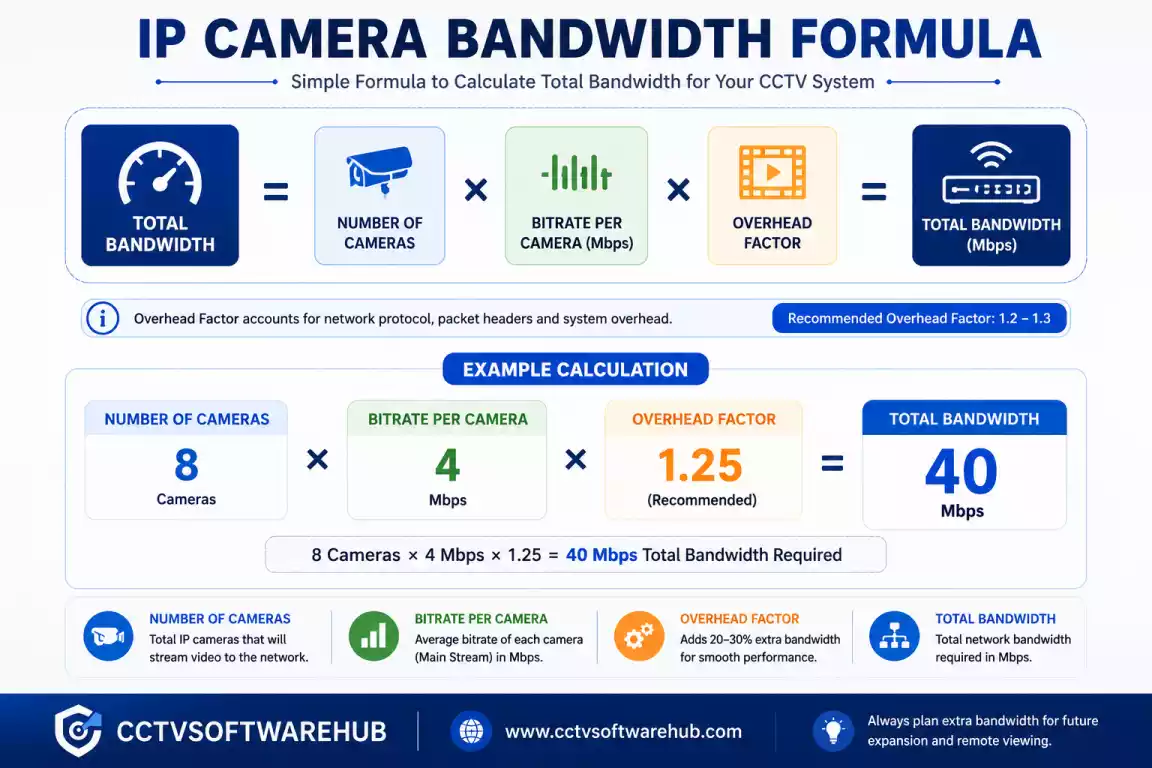
Basic Formula
Total Bandwidth (Mbps) =
Number of Cameras × Camera Bitrate (Mbps)
Example
8 Cameras × 4 Mbps

= 32 Mbps
If your cameras have different bitrates, calculate each stream separately and add them together.
Mixed Camera Example
| Camera | Bitrate |
|---|---|
| 4 × 1080P Cameras | 4 Mbps each |
| 4 × 4MP Cameras | 6 Mbps each |
Calculation:
(4 × 4)

+

(4 × 6)

=

40 Mbps
Formula for Remote Viewing
When users watch cameras remotely, the internet upload speed should comfortably exceed the total outgoing bandwidth.
For example:
Calculated Bandwidth

=

40 Mbps

Recommended Upload

≈

50 Mbps+
Leaving extra headroom helps maintain smooth streaming when additional users connect or motion increases the effective bitrate.
Formula for Network Planning
Camera Traffic

+

Viewing Traffic

+

Recording Traffic

+

Network Overhead

=

Actual Network Requirement
This explains why experienced installers rarely design networks right at the calculated limit.
The standard bandwidth calculator for IP cameras multiplies the number of cameras by the configured bitrate. For production networks, always allow additional capacity for viewing, recording, and future expansion.
What Bitrate Should You Use for Different Camera Resolutions?
Choosing the correct bitrate is one of the most important decisions in any surveillance project. A bitrate that is too low reduces image quality, while a bitrate that is unnecessarily high wastes both storage and bandwidth.
The following values are practical starting points for most installations. Actual recommendations vary slightly depending on scene complexity, lighting conditions, and camera model.
| Resolution | H.264 | H.265 | Recommended Bitrate |
|---|---|---|---|
| 720P | 2–3 Mbps | 1–2 Mbps | 2 Mbps |
| 1080P (2MP) | 4–6 Mbps | 2–4 Mbps | 4 Mbps |
| 3MP | 5–7 Mbps | 3–5 Mbps | 5 Mbps |
| 4MP | 6–8 Mbps | 4–6 Mbps | 6 Mbps |
| 5MP | 8–10 Mbps | 5–8 Mbps | 8 Mbps |
| 8MP (4K) | 12–16 Mbps | 8–12 Mbps | 10 Mbps |
These values are ideal for continuous recording at approximately 25–30 FPS.
If you reduce the frame rate or enable smart compression, you can often lower the required bitrate without significantly affecting video quality.
My Recommendation
Whenever possible, I configure cameras using H.265 with a balanced bitrate instead of simply selecting the maximum value. This approach usually provides excellent image quality while reducing network bandwidth and storage requirements.
The recommended bitrate depends on camera resolution and codec. H.265 generally delivers similar image quality at a lower bitrate than H.264, helping reduce overall bandwidth consumption.
How Much Bandwidth Does Each Camera Resolution Use?
Although the exact bandwidth depends on the configured bitrate, the following estimates work well for most surveillance systems.
| Resolution | FPS | Codec | Typical Bandwidth |
|---|---|---|---|
| 720P | 25 | H.265 | 2 Mbps |
| 1080P | 25 | H.265 | 4 Mbps |
| 3MP | 25 | H.265 | 5 Mbps |
| 4MP | 25 | H.265 | 6 Mbps |
| 5MP | 25 | H.265 | 8 Mbps |
| 4K | 25 | H.265 | 10 Mbps |
Using H.264, these values are generally higher because the codec is less efficient.
Remember that these are averages. Cameras monitoring busy roads, parking lots, or shopping malls often require a higher bitrate due to increased motion.
Real-World Observation
I have installed two identical 4MP cameras using the same settings. One monitored a quiet office corridor, while the other faced a busy road. The road-facing camera consistently generated a higher effective bitrate because there was far more movement in the scene.
This is one reason why Variable Bitrate (VBR) often produces more efficient results than Constant Bitrate (CBR).
Higher camera resolutions generally require higher bitrate, leading to increased bandwidth. Busy scenes with constant movement can consume more network resources than static environments.
H.264 vs H.265 – Which Codec Saves More Bandwidth?
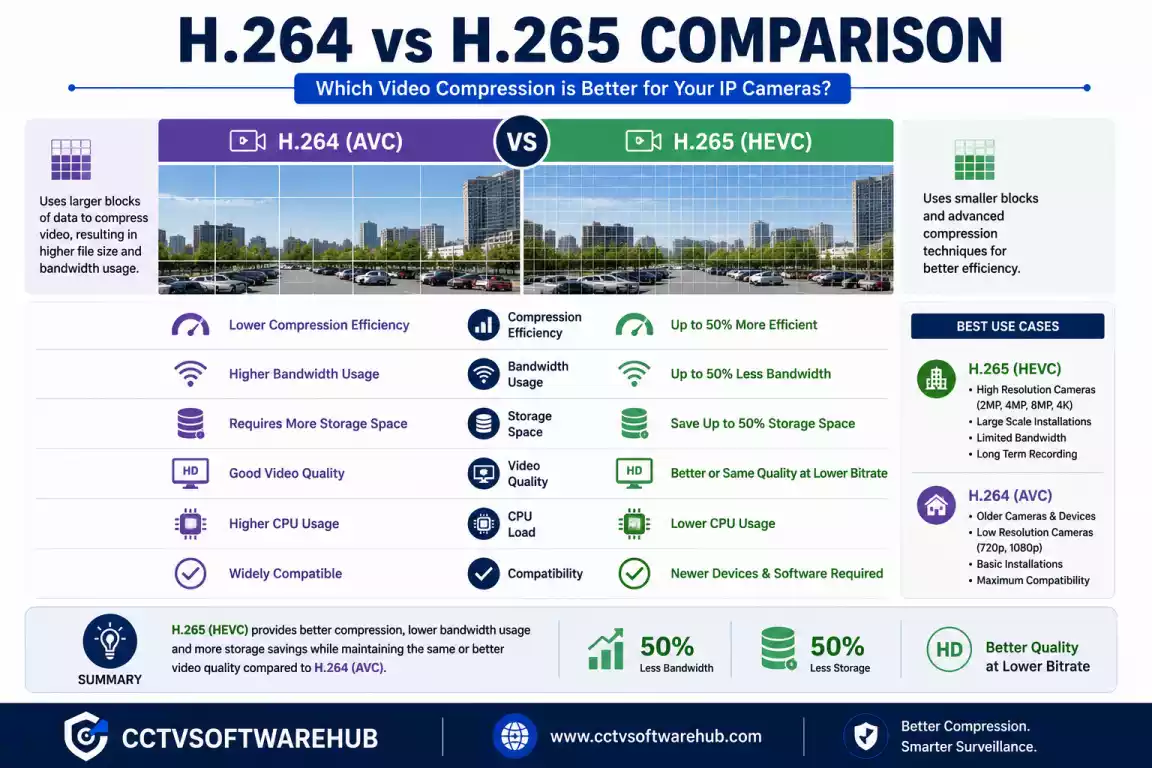
Video compression plays a major role in IP camera bandwidth calculation. Modern cameras typically support both H.264 and H.265, but they do not perform equally.
| Feature | H.264 | H.265 |
|---|---|---|
| Compression Efficiency | Good | Excellent |
| Bandwidth Usage | Higher | Lower |
| Storage Usage | Higher | Lower |
| Image Quality | Good | Excellent |
| Hardware Compatibility | Very High | High |
| CPU Requirement | Lower | Higher |
In most modern CCTV systems, H.265 can reduce bandwidth by approximately 30–50% compared with H.264, while maintaining similar image quality.
For example:
| Codec | Bitrate | Cameras | Total Bandwidth |
|---|---|---|---|
| H.264 | 6 Mbps | 8 | 48 Mbps |
| H.265 | 4 Mbps | 8 | 32 Mbps |
This difference becomes even more significant in larger deployments with dozens of cameras.
When Should You Use H.264?
Choose H.264 if:
- Older NVRs do not support H.265
- Legacy monitoring software lacks compatibility
- Hardware decoding is limited
When Should You Use H.265?
I recommend H.265 for nearly every new installation because it reduces both storage requirements and network bandwidth without sacrificing image quality.
H.265 is usually the better choice because it achieves similar video quality using less bitrate, reducing overall bandwidth and storage requirements compared with H.264.
CBR vs VBR – Which Bitrate Mode Should You Choose?
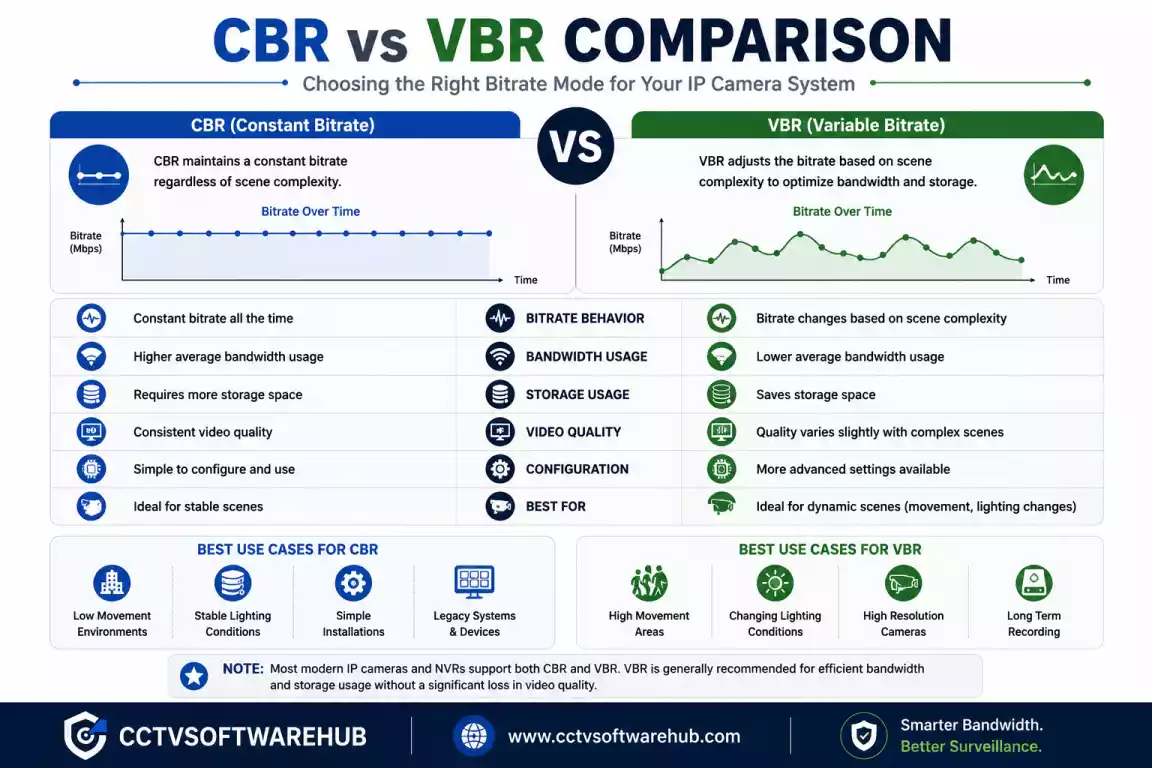
Another important factor affecting IP camera bandwidth is the camera’s bitrate control mode.
Most cameras offer two options:
- Constant Bitrate (CBR)
- Variable Bitrate (VBR)
Constant Bitrate (CBR)
With CBR, the camera maintains nearly the same bitrate regardless of scene activity.
Advantages
- Predictable bandwidth
- Easier network planning
- Consistent recording size
Disadvantages
- Wastes bandwidth in static scenes
- Less efficient compression
Variable Bitrate (VBR)
With VBR, the camera adjusts the bitrate automatically depending on scene complexity.
A quiet hallway may use only a small amount of bandwidth, while a crowded entrance temporarily increases the bitrate when movement occurs.
Advantages
- Better image quality
- Lower average bandwidth
- Reduced storage usage
Disadvantages
- Network traffic varies
- Slightly harder to estimate maximum load
Which One Do I Prefer?
For most modern CCTV installations, I prefer VBR because it provides better overall efficiency. However, in environments where predictable network utilization is essential, CBR can still be the better option.
CBR provides stable and predictable bandwidth, while VBR adjusts the bitrate based on scene activity. In most real-world CCTV installations, VBR offers better efficiency and lower average network usage.
What Factors Affect IP Camera Bandwidth?
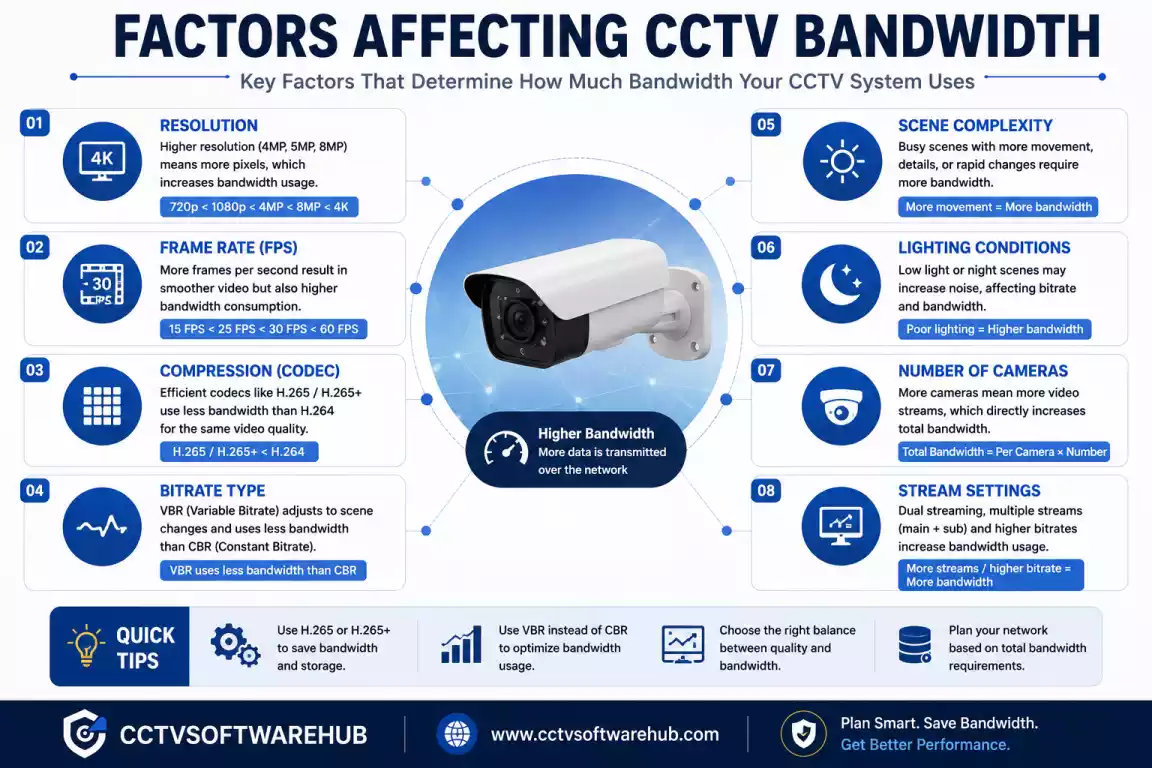
Although the number of cameras and bitrate are the biggest factors in IP camera bandwidth calculation, they are not the only ones. During CCTV installations, I’ve seen two systems with the same number of cameras consume very different amounts of bandwidth simply because of different camera settings or recording environments.
Understanding these factors will help you optimize your surveillance system without sacrificing video quality.
Does Camera Resolution Affect Bandwidth?
Yes. Higher camera resolutions require more data to capture and transmit each frame, which usually means a higher bitrate and more bandwidth.
Here’s a general comparison:
| Camera Resolution | Typical Bitrate (H.265) | Approximate Bandwidth |
|---|---|---|
| 720P | 2 Mbps | 2 Mbps |
| 1080P (2MP) | 4 Mbps | 4 Mbps |
| 3MP | 5 Mbps | 5 Mbps |
| 4MP | 6 Mbps | 6 Mbps |
| 5MP | 8 Mbps | 8 Mbps |
| 8MP (4K) | 10–12 Mbps | 10–12 Mbps |
If you don’t need to identify small details at long distances, using a 4MP camera instead of a 4K camera can significantly reduce your network load while still delivering excellent image quality.
How Does FPS Affect Bandwidth?
FPS (Frames Per Second) determines how many images your camera records every second.
Higher FPS creates smoother video but also increases the amount of data transmitted across your network.
Typical recommendations:
| FPS | Recommended Use |
|---|---|
| 10 FPS | Warehouses |
| 15 FPS | Homes |
| 20 FPS | Offices |
| 25 FPS | Retail Stores |
| 30 FPS | Casinos, Traffic Monitoring |
For most home and office installations, I recommend 15–20 FPS. In my experience, it provides a good balance between smooth video and reasonable bandwidth usage.
Why Is Bitrate the Biggest Factor?
If there is one setting that directly controls bandwidth, it is the bitrate.
Think of bitrate as the speed limit for your camera’s video stream.
For example:
| Bitrate | Network Bandwidth |
|---|---|
| 2 Mbps | 2 Mbps |
| 4 Mbps | 4 Mbps |
| 6 Mbps | 6 Mbps |
| 8 Mbps | 8 Mbps |
If you double the bitrate, you almost double the required bandwidth.
That’s why I always suggest checking your camera’s bitrate settings before upgrading your internet connection or network switch.
Does H.264 or H.265 Make a Difference?
Absolutely.
The video codec determines how efficiently your camera compresses video before sending it over the network.
H.264
- Widely supported
- Larger file sizes
- Higher bandwidth
- Good compatibility
H.265
- Better compression
- Lower bitrate
- Reduced bandwidth
- Lower storage usage
Whenever I install a modern CCTV system, I enable H.265 if both the camera and NVR support it. It reduces network traffic without noticeably affecting image quality.
Does Motion in the Scene Affect Bandwidth?
Yes, especially when you’re using Variable Bitrate (VBR).
Consider these two cameras:
- Camera 1 watches an empty office corridor.
- Camera 2 watches a busy road with constant traffic.
Even if both cameras use the same settings, the road-facing camera usually generates a higher bitrate because there is much more movement to encode.
This is why real-world bandwidth often differs slightly from theoretical calculations.
Does Audio Recording Increase Bandwidth?
Yes, but only slightly.
Adding audio streams consumes additional network resources. While the increase is small compared to video, it becomes noticeable when you’re managing dozens of cameras.
If audio isn’t required, disabling it can slightly reduce both bandwidth and storage consumption.
Do AI Features Increase Bandwidth?
Modern IP cameras include AI features such as:
- Human Detection
- Vehicle Detection
- Face Detection
- License Plate Recognition
- Smart Motion Detection
Most AI processing happens inside the camera, so these features don’t dramatically increase bandwidth. However, enabling additional metadata streams or high-quality snapshots may slightly increase network traffic.
Does Multiple Live Viewing Affect Bandwidth?
Yes.
If several users are watching live video simultaneously using software like Smart PSS, iVMS-4200, or Hik-Connect, the recorder sends additional video streams across the network.
For example:
- NVR Recording = 32 Mbps
- Two Live View Users = +10 Mbps
- Mobile Viewing = +5 Mbps
Actual network traffic can exceed 45 Mbps, even though the cameras themselves only generate 32 Mbps.
This is another reason I recommend leaving extra headroom when designing surveillance networks.
The main factors affecting IP camera bandwidth are bitrate, resolution, FPS, codec (H.264/H.265), motion in the scene, live viewing, audio, and AI features. Among these, bitrate has the greatest impact, while H.265 is one of the easiest ways to reduce overall network usage.
Frequently Asked Questions
What is an IP camera bandwidth calculator?
An IP camera bandwidth calculator estimates how much network bandwidth your CCTV system requires based on the number of cameras, bitrate, resolution, FPS, and codec.
I use this tool before every installation because it removes the guesswork from network planning. Instead of wondering whether a switch or internet connection is fast enough, I can calculate the expected traffic in advance.
How do I calculate IP camera bandwidth?
Multiply the number of cameras by the bitrate of each camera.
For example, if you have eight cameras configured at 4 Mbps, the total bandwidth is:
8 × 4 Mbps = 32 Mbps
If your cameras use different bitrates, calculate each one individually and add them together.
How much bandwidth does an IP camera use?
Most IP cameras use between 2 Mbps and 12 Mbps depending on their resolution, codec, and bitrate settings.
How much bandwidth does a 1080p IP camera use?
A typical 1080p IP camera uses around 4 Mbps with H.265 and 4–6 Mbps with H.264.
I usually configure 1080p cameras around 4 Mbps, as it provides a good balance between image quality and network efficiency for most homes and offices.
How much bandwidth does a 4K security camera use?
Most 4K security cameras require between 8 Mbps and 12 Mbps when using H.265 compression.
Busy environments such as parking lots or highways may require a higher bitrate to maintain image quality.
Does H.265 reduce bandwidth?
Yes. H.265 can reduce bandwidth by approximately 30–50% compared to H.264 while maintaining similar image quality.
Whenever the camera and recorder support it, I recommend enabling H.265 because it reduces both network traffic and storage requirements.
What affects IP camera bandwidth?
The biggest factors are bitrate, resolution, FPS, codec, scene complexity, and the number of cameras.
A camera overlooking an empty hallway uses less bandwidth than one monitoring a busy road because more motion requires more video data.
How many Mbps do 8 IP cameras need?
t depends on the configured bitrate.
For example:
8 × 2 Mbps = 16 Mbps
8 × 4 Mbps = 32 Mbps
8 × 6 Mbps = 48 Mbps
This is why I always recommend checking the camera bitrate instead of relying only on the camera resolution.
How many cameras can run on a 100 Mbps network?
There is no fixed number because it depends on the bitrate of each camera.
As a rough example:
25 cameras at 4 Mbps ≈ 100 Mbps
However, I don’t recommend using a network at 100% capacity. Leave at least 20–30% spare bandwidth for future expansion and temporary traffic spikes.
Is bitrate the same as bandwidth?
No. Bitrate and bandwidth are related, but they are not the same thing.
Bitrate is the amount of video data generated by the camera.
Bandwidth is the network capacity required to carry that data.
A camera set to 4 Mbps bitrate typically requires about 4 Mbps of network bandwidth.
How do I reduce CCTV bandwidth usage?
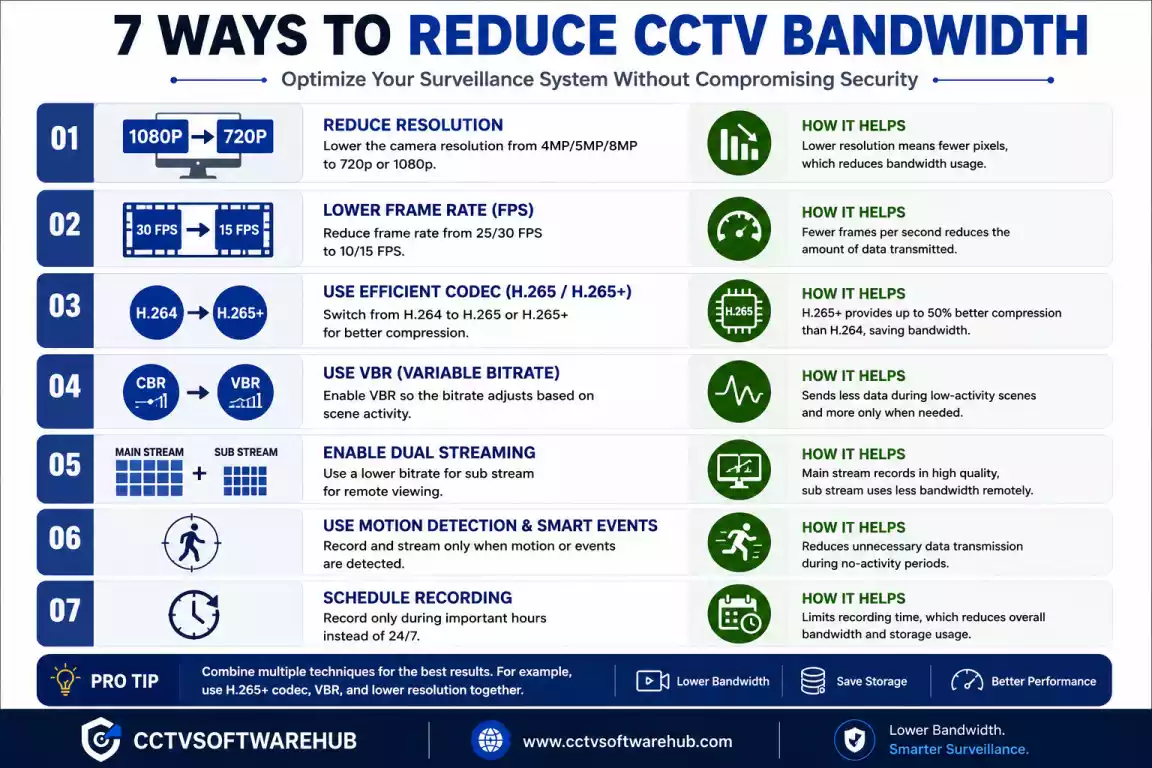
The best ways to reduce CCTV bandwidth are enabling H.265, lowering FPS, optimizing bitrate, enabling VBR, and using motion recording.
I usually start by enabling H.265 because it provides the biggest improvement without noticeably reducing image quality.
Which is better, CBR or VBR?
For most modern CCTV systems, VBR is the better choice because it adjusts the bitrate based on scene activity, reducing average bandwidth usage.
CBR is still useful when predictable network traffic is required, but VBR is usually more efficient for homes and businesses.
Conclusion
Choosing the right cameras is only part of building a reliable surveillance system. Your network must also be able to handle the video traffic those cameras generate. That’s exactly why I built this IP Camera Bandwidth Calculator.
Instead of estimating your network requirements, you can calculate them in seconds using the number of cameras, bitrate, resolution, FPS, and video codec. This helps you select the right PoE switch, NVR, router, and internet connection while avoiding lag, dropped frames, and buffering during remote viewing.
If you’re planning a new CCTV installation, I recommend using this calculator before purchasing any networking equipment. A few minutes of planning can save hours of troubleshooting later.
To complete your surveillance planning, you can also use my CCTV Storage Calculator to estimate hard drive capacity and explore my guides on iVMS-4200, Smart PSS, Hik-Connect, and Dahua Config Tool for camera management and remote monitoring.
If you’re using cameras from different manufacturers, look for ONVIF compatibility to ensure they work seamlessly with your NVR.
The IP Camera Bandwidth Calculator helps you estimate the network bandwidth required for your CCTV system using camera count, bitrate, resolution, FPS, and codec. Accurate bandwidth planning ensures smooth recording, reliable remote viewing, and the correct selection of switches, routers, and NVRs, making it an essential step before installing any IP camera system.